User Guide
This section describes how users can acquire data using ultrasound hardware. Users can communicate with the device via a communication session object. During the session it is possible to upload and run operations.
Configuring session
Note
The below sections contains details on how to configure the provided hardware. You can skip to the section how to run examples if you already have a session configuration file prepared by e.g. us4us developers, and you don’t need to change any device-related parameters.
Session configuration file
A session configuration file consists of device settings valid for a given session. Currently, the configuration file can be written in .prototxt file (a protobuf I/O format readable for humans). Sample configuration files are available here.
Currently only us4R device can be configured using session configuration file.
us4R
To use the us4R system in a particular session, create a field us4r in the
session configuration file.
us4r: {
  # here goes us4r configuration spec.
  hv: {
    # ...
  }
  probe: {
    # ...
  }
  adapter: {
    # ...
  }
}
The us4R device typically includes a high voltage supplier,
which can be configured by providing the hv field. The following power
supplies are currently supported:
the legacy us4R-Lite systems or us4R-lite+ with the external HV: manufacturer:
us4us, name:hv256,us4R-lite+ systems without the external HV: manufacturer:
us4us, name:us4oemhvps,the legacy us4R systems or us4R system with the external HV: manufacturer:
us4us, name:us4rpsc,us4R+ systems without the external HV: manufacturer:
us4us, name:us4oemhvps,us4OEM+ with internal HV: manufacturer:
us4us, name:us4oemhvps.
Example:
hv: {
  model_id {
    manufacturer: "us4us"
    name: "hv256"
  }
}
To turn off the high voltage supplier, skip the hv field.
Based on the HV selected, our software will try to automatically select the type of digital backplane (DBAR) to be used:
for the systems with
hv256power supply,dbarlitewill be used,for the systems with
us4rpscpower supply,us4rpscwill be used,for the systems
us4oemhvps, a system with no digital backplane will be assumed.
It is also possible to explicitly specify the backplane model in the configuration file:
digital_backplane: {
  model_id {
    manufacturer: "us4us"
    name: "model_name"
  }
}
Where model_name can be one of the following: dbarlite or us4rdbar.
To configure us4r’s signal transmission/data reception, it is essential to specify the settings of the probe and probe adapter used in the system.
Specify the settings of the probe and probe adapter
Examples:
Probe Model
The user can specify which probe model they are currently using in one of the following ways:
describe probe model by providing the
probefield, e.g.:
probe: {
  id: {
    manufacturer: "acme"
    name: "my_custom_probe"
  }
  n_elements: 64,
  curvature_radius: 50e-3,
  pitch: 0.21e-3,
  tx_frequency_range: {
    begin: 1e6,
    end: 40e6
  },
  voltage_range: {
    begin: 0,
    end: 100
  }
  lens: {
    thickness: 1e-3,
    speed_of_sound: 2000,
    focus: 20e-3
  }
  matching_layer: {
    thickness: 0.1e-3,
    speed_of_sound: 2100
  }
}
The following probe attributes can be specified:
id: a unique probe model id — a pair:(manufacturer, name),n_elements: number of probe elements,pitch: distance between two adjacent probe elements [m],curvature_radius: radius of probe’s curvature; when omitted and n_elements is a scalar, a linear probe type is assumed [m],tx_frequency_range: acceptable range of center frequencies for this probe [min, max] (a closed interval) [Hz],voltage_range: range of acceptable voltage values, 0.5*Vpp.
Optionally, you can also provide the following attributes:
lens: probe’s lens parameters,matching_layerprobe’s matching layer parameters.
The following lens attributes can be specified:
thickness: lens thickness measured at center of the elevation [m],speed_of_sound: the speed of sound in the lens material [m/s],focus: OPTIONAL, geometric elevation focus in water [m].
The following matching_layer attributes can be specified:
thickness: matching layer thickness [m],speed_of_sound: matching layer speed of sound [m/s].
specify probe model by providing
probe_id:
probe_id: {
  manufacturer: "esaote",
  name: "sl1543"
}
If the latter method is used, the probe model description will be searched in the dictionary file.
When no dictionary file is provided, the Default dictionary will be assumed.
Probe-to-adapter connection
The probe_to_adapter_connection field specifies how the probe elements
map to the adapter channels.
There are several ways to specify this mapping:
channel_mapping- a list of adapter channels to which the subsequent probe channels should be assigned, i.e.channel_mapping[i]is the adapter’s channel to be assigned to probe channelichannel_mapping_ranges- a list of adapter channel regions to which the subsequent probe channels should be assigned.
See here
for an example usage of probe_to_adapter_connection field.
Note:
This field is required only when a custom probe and adapter are specified in
the session configuration file (i.e. probe and adapter fields).
When the probe_id or adapter_id are provided and the connection between
them is already defined, this field can be omitted — the arrus package will
try to determine the probe-adapter mapping based on the dictionary file.
When probe_to_adapter_connection is still given, it will overwrite
the settings from the dictionary file.
Multi-probe systems
It is also possible to specify multiple probes in situations where the system actually has multiple transducers connected. To do this, provide a list of probe definitions, for example:
probe: [
   {
       id: {
           manufacturer: "us4us"
           name: "first_probe"
       }
       n_elements: 64,
       pitch: 0.2e-3,
       tx_frequency_range: {
           begin: 1e6,
           end: 15e6
       },
       voltage_range {
           begin: 0,
           end: 30
       }
   },
   {
       id: {
           manufacturer: "us4us"
           name: "second_probe"
       }
       n_elements: 192,
       pitch: 0.1e-3,
       tx_frequency_range: {
           begin: 1e6,
           end: 15e6
       },
       voltage_range {
           begin: 0,
           end: 30
       }
   }
]
and indicate the probe elements to the system channels mapping, for example:
probe_to_adapter_connection: [
    {
        probe_model_id: {
            manufacturer: "us4us"
            name: "first_probe"
        }
        probe_adapter_model_id: {
            manufacturer: "us4us"
            name: "adapter"
        },
        channel_mapping_ranges: [
        {
            begin: 0
            end: 63
        }],
    },
    {
        probe_model_id: {
            manufacturer: "us4us"
            name: "second_probe"
        }
        probe_adapter_model_id: {
            manufacturer: "us4us"
            name: "adapter"
        },
        channel_mapping_ranges: [
        {
            begin: 64
            end: 255
        }
        ],
    }
]
The order of the probes listed in the probe field affects their identifiers at runtime:
the first probe will have the ID Probe:0, the second Probe:1, and so on.
IO bitstreams and probe external MUXing
It is possible to define IO bitstreams for the purpose of interfacing with external devices e.g.: external MUX to switch probe or probe elements connectivity. In particular, it is possible to define a collection of IO bitstreams to be later used during runtime.
A single bitstream is defined by specifying its states and the duration of each
individual state it consists of using Run-Length Encoding (RLE),
for example in the .prototxt:
bitstreams: [
# bitstream 1
{
  levels: [...]
  periods: [...]
},
# bitstream 2
{
  levels: [...]
  periods: [...]
}
]
The levels field specifies the sequence of “IO levels” to be generated by the device.
IO level is a 4-bit number, where the i-th bit indicates the level of the i-th IO.
The value of periods[i] indicates that the state levels[i] should last for periods[i] + 1 clock cycles (clock 5 MHz).
For example:
bitstreams: [
  {
    levels: [8, 0, 5, 0]
    periods: [0, 1, 4, 0]
  }
]
The above:
sets level 1 on IO 3, level 0 on the remaining IOs, for 0.2 us,
then, sets level 0 on all IOs, for 0.4 us,
then, sets level 1 on IOs 0 and 2, 0 on IOs 1 and 3, for 1 us,
then, sets level 0 on all IOs, for 0.2 us.
Now, it is also possible to specify an IO bitstream that should be triggered before starting TX/RX
for the probe indicated in the TX/RX placement parameter, using the bitstream_id parameter, e.g.:
probe_to_adapter_connection: [
  {
    probe_model_id: {
      manufacturer: "acme"
      name: "probe1"
    }
    probe_adapter_model_id: {
      manufacturer: "us4us"
      name: "adapter"
    },
    channel_mapping_ranges: [
    {
      begin: 192
      end: 255
    }],
    bitstream_id: {ordinal: 1}
  },
  {
    probe_model_id: {
      manufacturer: "acme"
      name: "probe2"
    }
    probe_adapter_model_id: {
      manufacturer: "us4us"
      name: "adapter"
    },
    channel_mapping_ranges: [
    {
      begin: 0
      end: 191
    }],
    bitstream_id: {ordinal: 2}
  }
]
Bitstream numbering (assigning bitstream IDs) starts from 1 (bitstream 0 is reserved for internal purposes).
Using the functionality of configurable IO bitstreams is optional.
Rx Settings
The user can specify the default data reception settings to be set on all system modules. To do this, add an rx_settings with the following attributes:
dtgc_attenuation: digital time gain compensation to apply (given as attenuation value to apply). Available values: 0, 6, 12, 18, 24, 30, 36, 42 [dB]. Optional, no value means turn off DTGC.pga_gain: a gain to apply on a programmable gain amplifier. Available values: 24, 30 [dB]lna_gain: a gain to apply on a low-noise amplifier. Available values: 12, 18, 24 [dB]tgc_samples: a list of tgc curve samples to apply [dB]. Optional, no value/empty list means turn off TGClpf_cutoff: low-pass filter cut-off frequency, available values: 10000000, 15000000, 20000000, 30000000, 35000000, 50000000 [Hz]active_terminationactive termination to apply, available values: 50, 100, 200, 400. Optional, no value means turn off active termination.
Channel masks
To turn off specific channels of the us4R system (i.e. the probe elements),
add the following field to the us4r settings:
channels_mask: a list of system channels that should always be disabled.
TX/RX limits
The .prototxt provides you also the possibility to set constraints (“limits”)
on the TX parameters to be used in run-time.
The default constraints for the transmit pulse length include, among others,
a maximum of 32 cycles of the TX pulse. It is possible to increase the TX pulse length
(for example, to enable imaging methods utilizing long transmit bursts, like SWE)
by setting tx_rx_limits in the .prototxt file.
At the same time, you can restrict some other TX parameters,
such as voltage or PRF (PRI), so as to avoid transmitting a pulse that could be
harmful to the probe, the system, or the target medium.
Example:
tx_rx_limits: {
  voltage: {begin: ..., end: ...}, # [V]
  pulse_length: {begin: ..., end: ...}, # [seconds],
  pri: {begin: ..., end: ...} # [seconds]
}
The interval {begin: …, end: …} defines minimum and the maximum allowable value.
If this TX/RX limits are not provided, default constraints apply.
Watchdog
The us4OEM+ firmware and software implements a host - ultrasound watchdog mechanism.
The purpose of the watchdog is to prevent situations where the OEM board maintains a high HV voltage or continues executing a TX/RX sequence without control from the host PC. The firmware-based OEM watchdog disables HV and trigger when a loss of connection with the host PC is detected. The host PC also detects the lack of response from the device, appropriately notifies the user, and shuts down the entire system.
In some rare cases, some additional watchdog configuration may be needed in order to run the us4R-lite system seamlessly. For example, if the performance of the host PC does not allow for a sufficiently fast response to the OEMs.
You can change the following watchdog parameters:
watchdog: {
    enabled: true
    oem_threshold0: 1.0  # [seconds]
    oem_threshold1: 2.0  # [seconds]
    host_threshold: 3.0  # [seconds]
}
where:
enabled: (bool): whether watchdog should be turned on (true) or off (false), default: true,oem_threshold0: the time after which a “warning” interrupt will be sent to the host PC if the host PC fails to report that it is still alive, default: 1.0,oem_threshold1: the time after which OEM+ will be shut down (stop triggering + turn off HVPS) if the host PC fails to report that it is still alive, default: 1.1,host_threshold: the time after which the host PC will assume that OEM+ is not functioning, if it fails to report that it is still alive, default: 1.0.
You can also turn off the watchdog mechanism by setting the enabled field to false, e.g.:
watchdog: {enabled: false}
Trigger source (TRIG IN/OUT)
By default, us4us systems use an internal trigger source, which runs according to the PRI and SRI settings from the TX/RX sequence. To enable an external trigger source, the following parameter must be set in the configuration file:
external_trigger: true
The trigger output is always enabled by default.
Dictionary
It is possible to specify a dictionary of probe models and adapters that are
supported by the us4R system. To do this, add the dictionary_file field
to the configuration file:
dictionary_file: "dictionary.prototxt"
Currently, the dictionary.prototxt file will be searched in the same
directory where session settings file is located.
When no dictionary file is provided, the Default dictionary is assumed.
An example dictionary is available here: https://github.com/us4useu/arrus/blob/develop/arrus/core/io/test-data/dictionary.prototxt
The dictionary file contains a description of ultrasound probes and adapters that are supported by the us4R device. The file consists of the following fields:
probe_adapter_models: [
  {
    # probe adapter description, the same as described for us4r.adapter field
  },
  {
    # probe adapter description...
  }
]

probe_models: [
  {
    # probe model description, the same as described for us4r.probe field
  },
  {
    # probe model description...
  }
]

probe_to_adapter_connections: [
  {
    # probe to adapter connection, the same as described for us4r.probe_to_adapter_connection field
  },
  {
    # probe to adapter connection...
  }

]
Default dictionary
Arrus package already contains a dictionary files of probes and adapters that
were tested on us4r devices.
To use the default dictionary, omit providing dictionary_file field in your
session configuration file.
Currently, the default dictionary contains definitions of the following probes:
esaote:
probes:
sl1543,al2442,sp2430,ac2541,adapters:
esaote2,esaote3,esaote2-us4r6,esaote3-us4r6
als:
probes:
l14-6aadapters:
esaote2,esaote3
apex:
probes:
tl094adapters:
esaote2,esaote3
ultrasonix:
probes:
l14-5/38,l9-4/38adapters:
ultrasonix,pau_rev1.0
olympus:
probes:
5L128,10l128,5l64,10l32,5l32,225l32adapters:
esaote3
ATL/Philips:
probes:
l7-4,c4-2,adapters:
atl/philips
custom Vermon linear array:
probes:
la/20/128adapters:
atl/philips
custom Vermon matrix array (32x32):
probes:
mat-3dadapters:
3d
Vermon RCA arrays:
probes:
RCA/6/256,RCA/3/64+64adapter:
dlp408r
Running example scripts
The general overview of data acquisition and processing is as follows:
prepare scheme to be executed on the devices,
start new session,
upload created scheme,
run the uploaded scheme,
get data from the output buffer.
Let’s delve into the details of each stage; we will describe the whole process
on the example of a plane_wave_imaging.py script.
Creating Scheme
First we need to describe data acquisition process (and possibly data
processing pipeline). In the arrus package that description is called Scheme.
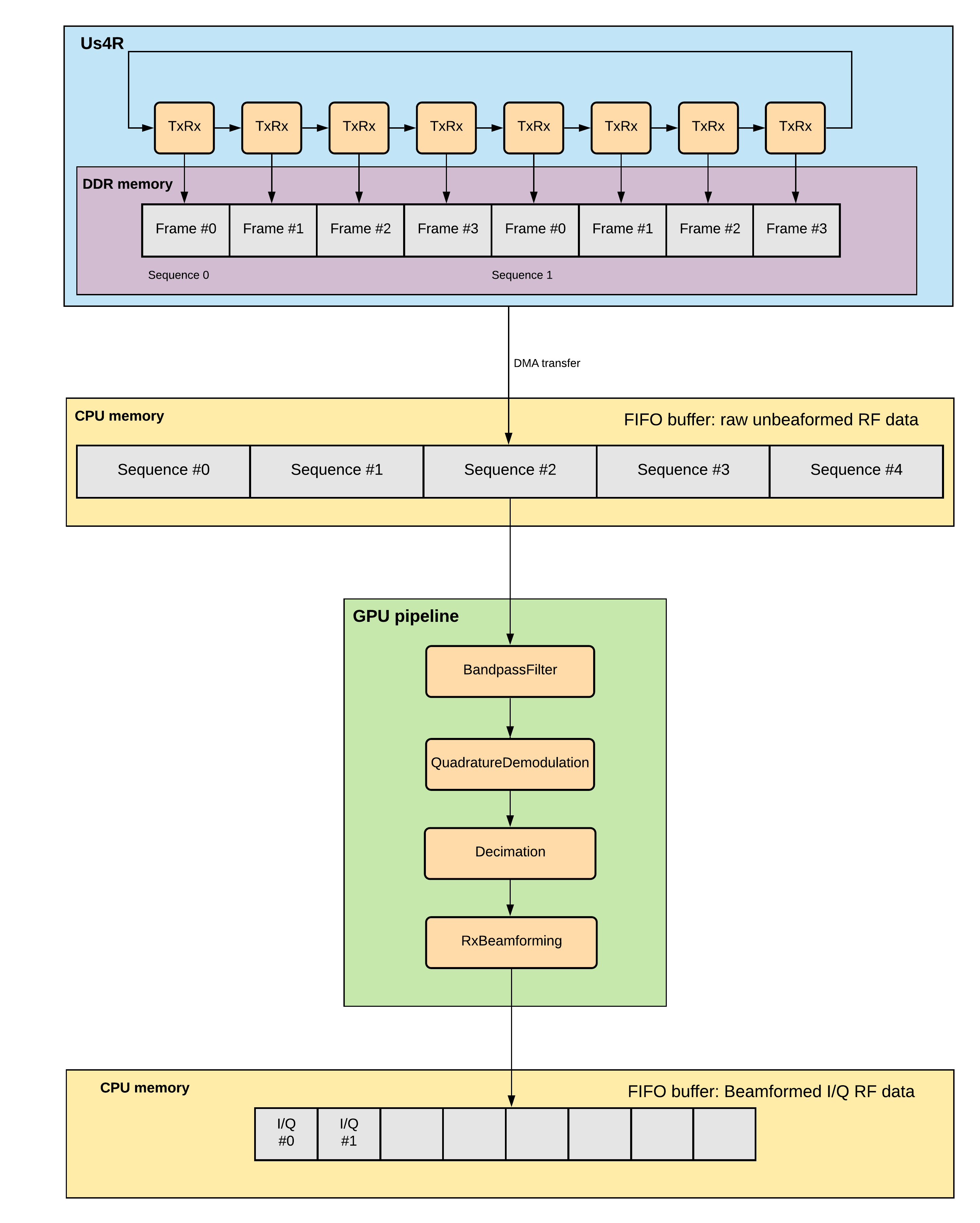
Fig. 2 An example of scheme.
The Scheme describes:
tx/rx sequence to perform on the ultrasound device (in loop),
optional: data processing pipeline to run when new data arrives,
optional: description of the output buffer on host computer, to which the data should be written,
optional: ultrasound device work mode: “HOST”, “SYNC”, or “ASYNC” mode.
scheme = Scheme(
    tx_rx_sequence=sequence,
    processing=processing_pipeline,
    rx_buffer_size=4,
    output_buffer=DataBufferSpec(type="FIFO", n_elements=12),
    work_mode="HOST"
)
TX/RX Sequence
The tx/rx sequence can be described using one of the common sequences
or by preparing a custom sequence of TxRx objects (see custom_tx_rx_sequence.py
example). For example, to transmit plane waves at three different angles,
create the arrus.ops.imaging.PwiSequence object:
sequence = arrus.ops.imaging.PwiSequence(
    angles=np.asarray([-5, 0, 5])*np.pi/180,
    pulse=Pulse(center_frequency=8e6, n_periods=3, inverse=False),
    rx_sample_range=(0, 4096),
    downsampling_factor=2,
    speed_of_sound=1490,
    pri=100e-6,
    sri=20e-3,
    tgc_start=14,
    tgc_slope=0)
It is also possible to configure a list of TX/RX sequences to be executed
one after the another within a single Scheme.
This requirement arises from the fact that it is often necessary to execute multiple logically distinct sequences in a specific order — for example, to run different sequences on different probes connected to the same ultrasound system, or to run TX/RX sequences for different imaging modalities.
For instance, in B-mode – Color Doppler Duplex imaging, it should be possible to define a sequences such as:
scheme = arrus.ops.us4r.Scheme(
  tx_rx_sequence=[
      arrus.ops.us4r.TxRxSequence(
        ops=[
            TxRx(
                tx=Tx(..., placement="Probe:0"),
                rx=Rx(..., placement="Probe:0"),
                ...
            ),
        ],
        name="Bmode"
      ),
      arrus.ops.us4r.TxRxSequence(
        ops=[
            TxRx(
                tx=Tx(..., placement="Probe:0"),
                rx=Rx(..., placement="Probe:0"),
                ...
            ),
        ],
        name="ColorDoppler"
      ),
  ]
)
For the Scheme as defined above, the system will cyclically perform Bmode followed by ColorDoppler.
Current limitations:
Within a single sequence, all TX/RX operations must have the same TX and RX placement.
Each sequence should produce an n-dimensional array with well-defined dimensions. This means that within a given sequence, all TX/RX operations must have, among other things, the same number of receive channels and the same number of samples.
Custom TX waveforms
Note
Custom TX waveforms are available only for the OEM+ systems.
It is possible to specify arbitrary waveforms using
arrus.ops.us4r.Waveform, arrus.ops.us4r.WaveformSegment
arrus.ops.us4r.WaveformBuilder
classes.
Conceptually, WaveformSegment is one particular fragment of a Waveform:
it is a sequence of states WaveformSegment.states along with their duration Waveform.duration.
Importantly, the entire segment can be repeated multiple times (using the ``Waveform.n_repeats`` parameter) without consuming the internal memory
of TX pulsers (which is limited to 256 registers for the OEM+ rev 1).
Waveform is a collection of segments to be set on the device pulsers.
WaveformBuilder is a convenience class that allows to build the waveform as a sequence of states and duration.
5-level Waveforms
In the us4OEM+ there are 2 positive HV rails (HVP0 and HVP1) and 2 negative rails (HVM0 and HVM1).
In ARRUS, we translate the concept of the rail to the concepts of the amplitude and Waveform states in the following way:
The waveform state is a
WaveformSegmentattributes: it can be one of {-2, -1, 0, 1, 2} The valuesis translated to HV rail in the following way:s = -2 corresponds to HVM0, s = +2 corresponds to HVP0,
s = -1 corresponds to HVM1, s = +1 corresponds to HVP1,
s = 0 corresponds to CLAMP state.
The
amplitudeis aPulseattribute: it can be one of {1, 2}. ThePulseobject is translated to a periodic pulse (Waveform) (l, -l), repeated a given number of times (n_periods), with the given transmitting frequency (center_frequency).
You can set the amplitudes -2, -1, +1, +2 using the us4r.set_hv_voltage method, e.g.:
us4r.set_hv_voltage((m1, p1), (m2, p2))
where:
m1is the HV voltage for the state -1 (absolute value),p1is the voltage for the state +1,m2is the voltage for the state -2 (absolute value),p2is the voltage for the state +2.
NOTE: all of the set_hv_voltage values must be positive.
The following restrictions apply: m1 < m2 and p1 < p2.
Example
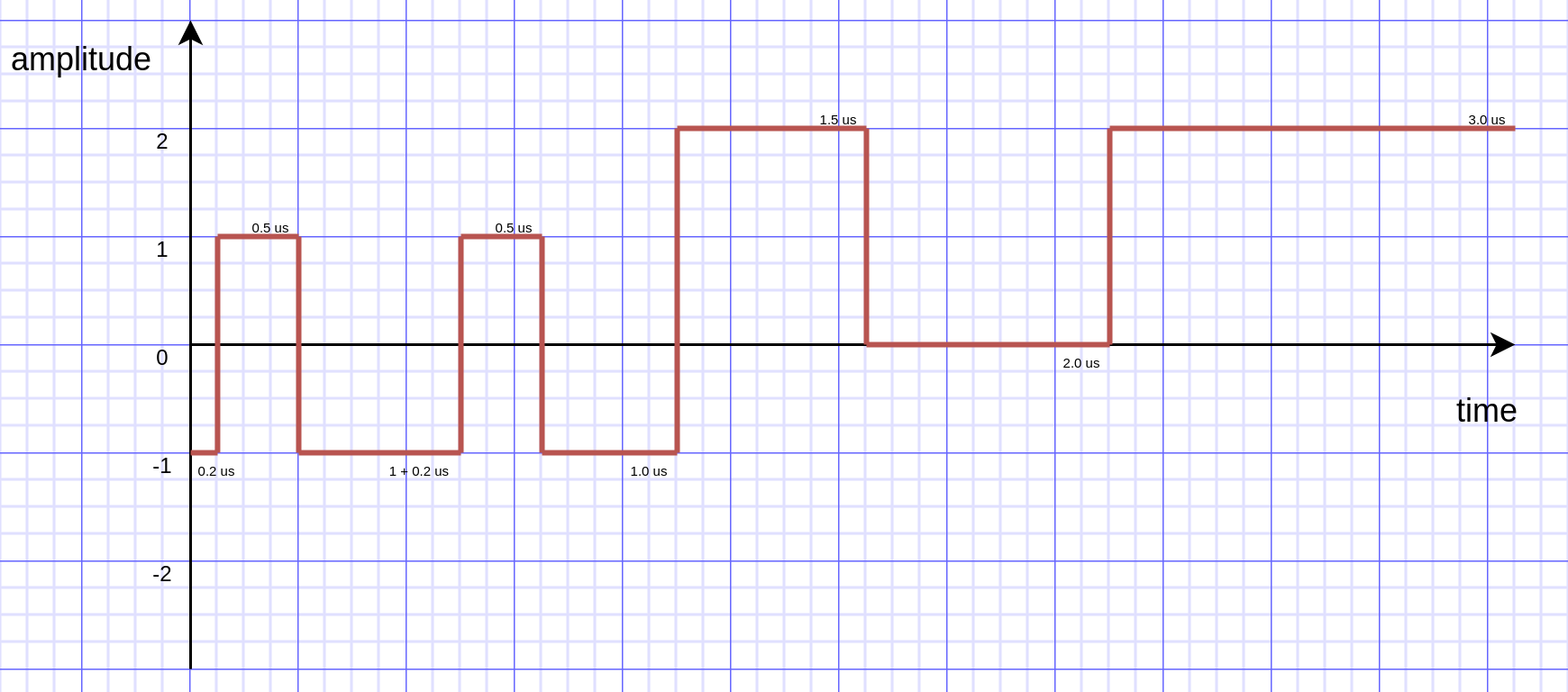
Fig. 3 Example custom TX waveform.
Please also see the api/python/examples/custom_waveform.py script.
us4r.set_hv_voltage((5, 6), (10, 11))

wfBuilder = WaveformBuilder()
# Set states -1 (0.2 us), 1 (0.5 us), -1 (1 us), and repeat that twice.
wfBuilder.add(duration=[0.2e-6, 0.5e-6, 1e-6],
              state   =[-1,     1,      -1],
              n=2)
# Set states 2 (1.5 us), 0 (2 us), 2 (3 us).
wfBuilder.add(duration=[1.5e-6, 2e-6, 3e-6],
              state   =[2,      0,   2])
wf = wfBuilder.build()

seq = TxRxSequence(
    ops=[
        TxRx(
            Tx(aperture=[True]*n_elements,
               excitation=wf,
               delays=[0]*n_elements),
            Rx(aperture=[True]*n_elements,
               sample_range=(0, 4096),
               downsampling_factor=1),
               pri=200e-6
        ),
    ],
)
Processing
Optionally, it is also possible to provide a data processing that should be run when new data arrives. For example, b-mode reconstruction for plane wave imaging can be implemented using the following pipeline:
x_grid = np.linspace(-15, 15, 256) * 1e-3
z_grid = np.linspace(0, 40, 256) * 1e-3

processing = Pipeline(
        steps=(
            RemapToLogicalOrder(),
            Transpose(axes=(0, 2, 1)),
            BandpassFilter(),
            QuadratureDemodulation(),
            Decimation(decimation_factor=4, cic_order=2),
            ReconstructLri(x_grid=x_grid, z_grid=z_grid),
            Mean(axis=0),
            EnvelopeDetection(),
            Transpose(),
            LogCompression(),
        ),
        placement="/GPU:0"
    )
The above code creates a pipeline, which will put the reconstructed b-mode images into the output buffer. A handle to the output buffer will be returned on the scheme upload.
Note
Currently python API allows for data processing implemented using
arrus.utils.imaging package only, which uses cupy/numpy packages.
An optimized imaging pipeline for real-time b-mode reconstruction
will be available soon.
Work mode
Here we will describe the whole structure of processing done by the host PC and us4R-Lite/us4oem systems.
Generally, the following processes run after starting scheme:
Us4R executes TX/RX sequence (cyclically) and saves the acquired channel RF data to Us4R RX buffer,
PCI DMA transfers the acquired data to Host PC buffer element, pointing to some host’s memory area,
Host PC processes the data, and marks the buffer element as released, that is the memory area for that element can be filled with new data.
In other words:
Us4R produces channel data to Us4R RX buffer, which is consumed by DMA,
DMA produces channels data to Host PC buffer, which is consumed by some data processor.
“Us4R RX buffer” is an n-element circular buffer in “Us4R DDR” memory,
“Host PC buffer” is an n-element circular buffer stored in the host PC RAM.
In ARRUS package currently we have a couple of work modes, the choice of which affects how processes (1), (2) and (3) works with each other.
Work mode HOST
Us4R executes a single TX/RX sequence (1), then DMA copies the data (2), then Host PC processes the data (3), then Us4R executes a single TX/RX sequence (1), DMA copies data, … and so on.
Processes (1), (2), and (3) are executed sequentially, one after another, so
the total time between consecutive TX/RX sequence executions is equal to
t(1) + t(2) + t(3), where t(i) is the time needed to execute i-th process.
When using HOST work mode, PRI is guaranteed within a single TX/RX sequence, but is not guaranteed between executions of the TX/RX sequences, because (1) waits until (2) and (3) are finished, and the execution time of (3) can generally be arbitrary (if we assume that (3) does not meet the hard real-time constraints).
This mode is useful when:
(3) cannot meet the hard real-time constraints determined by the selected PRI or (2) cannot satisfy given frame rate,
a strict PRI guarantee between sequences (or batches of sequences) is not needed,
the size of data collected by one sequence (or batches of sequences) does not exceed the size of the available DDR memory on us4OEM modules (4 GiB per module),
the length of a single TX/RX sequence does not exceed 1024 (the number of raw TX/RXs in a single batch of sequences does not excceed 16384).
Work mode “HOST” is the easiest one to use and should be preferred in the first experiments.
Work mode ASYNC
Processes (1), (2) and (3) run in parallel and communicates through Us4R RX buffer and Host PC buffer.
process (1) runs cyclically, with guaranteed PRI, stops only after stop_scheme is called or error is detected,
process (2) waits for new data in the Us4R RX buffer and then copies it to Host PC buffer when it’s ready,
process (3) waits for new data, processes data and releases buffer element.
As the buffers are of a finite size, and (1), (2) and (3) may have different execution times:
when the process (1) detects that it is trying to overwrite data that has not yet been transferred, it will report the “RX Buffer overflow” error,
when the process (2) detects that it is trying to overwrite data that has not yet been processed (i.e. buffer element’s release function is called), it will report the “Host buffer overflow” error.
The first error is usually reported, when data transfer rate is to slow compared to the acquisition rate, the second error is usually reported when data processing is to slow compared to the transfer and acquisition rate.
The effective frame rate in this case is max{t(1), t(2), t(3)}, which is
basically t(1) as the processes (2) and (3) have to keep pace with (1).
This mode of operations is useful when:
a strict PRI guarantee between all sequences (batches of sequences) is required,
PCIE transfer (2) is enough to transfer data with the appropriate frame rate, (3) keeps strict processing time regime.
If (2) and (3) takes too long/cannot keep strict processing time regime, its necessary to increase PRI, or set SRI or use HOST work mode.
Work mode SYNC
The SYNC mode works the same way as ASYNC, except that the ultrasound system halts signal acquisition if it encounters a situation where buffer memory has not been released quickly enough. In this mode, you can treat the buffers between the us4R-lite system and the host PC as blocking queues.
This mode is generally preferred over ASYNC because it always ensures data consistency, at the cost of potentially uneven PRF—but only in cases where data transfer or processing is not fast enough.
Running the Scheme
To run the scheme:
start new session,
set device parameters if necessary,
upload scheme,
start scheme.
If you want to display reconstructed b-mode images,
you can use arrus.utils.gui.Display2D class as show below, by providing
buffer returned on scheme upload. The arrus.utils.gui.Display2D
class requires matplotlib package installed.
with arrus.Session(r"C:\Users\Public\us4r.prototxt") as sess:
    us4r = sess.get_device("/Us4R:0")
    us4r.set_hv_voltage(50)

    # Upload sequence on the us4r-lite device.
    buffer, const_metadata = sess.upload(scheme)
    display = Display2D(const_metadata=const_metadata, value_range=(20, 80), cmap="gray")
    sess.start_scheme()
    display.start(buffer)
The Session object can be treated as Python context manager.
You can provide in it’s constructor a path to the session configuration file, or
use the default search path which is stored in ARRUS_PATH environment variable.
By default us4r.prototxt will be searched in ARRUS_PATH if you don’t
provide a path in Session’s constructor.
The function display.start starts displaying reconstructed images and blocks
the current thread until the window is closed. When the program leaves the
arrus.Session context manager scope, the scheme is stopped and
the connection to all the running devices is closed.
Running custom callback functions
You can provide your own custom callback functions that should be run when
raw RF channel data arrives in the ultrasound device output buffer.
In order to do that, use buffer.append_on_new_data_callback(callback):
with arrus.Session(r"C:\Users\Public\us4r.prototxt") as sess:
    us4r = sess.get_device("/Us4R:0")
    us4r.set_hv_voltage(50)

    # Upload sequence on the us4r-lite device.
    buffer, const_metadata = sess.upload(scheme)
    def callback(element):
        print("Got new data!")
    buffer.append_on_new_data_callback(callback)
    sess.start_scheme()
    time.sleep(10)
Implementing custom arrus.utils.imaging operations
Note
The interface presented below is experimental and can be changed in the future.
It is possible to provide custom processing steps for the
arrus.utils.imaging package. In order to do that, you have to implement
the following interface:
class MyCustomOperation(arrus.utils.imaging.Operation):

    def prepare(self, const_metadata):
        """
        OPTIONAL.
        Function that will called when the processing pipeline is prepared.

        :param const_metadata: const metadata describing output from the \
          previous Operation.
        :return: const metadata describing output of this Operation.
        """
        pass

    def process(self, data):
        """
        Function that will be called when new data arrives.

        :param data: input data
        :return: output data
        """
        return data
The
processfunction will be called when new data arrives, at the appropriate stage of the pipeline.The
preparefunction will be called on Pipeline initialization. You should implement this function if you want to do some initialization based on Metadata object, which contains the complete trace of data acquisition and processing done made before the current step.
Note
If your implementation of process function returns an array, that
have a different shape or data other than the input array,
you have to override the prepare function, You can signal appropriate
changes using const_metadata.copy() function, for example
const_metadata.copy(dtype="complex64", input_shape=(128, 1024)).
This requirement may be changed in the future versions of arrus package.
You can put your custom operation into the pipeline:
processing = Pipeline(
        steps=(
            RemapToLogicalOrder(),
            Transpose(axes=(0, 2, 1)),
            BandpassFilter(),
            QuadratureDemodulation(),
            Decimation(decimation_factor=4, cic_order=2),
            ReconstructLri(x_grid=x_grid, z_grid=z_grid),
            MyCustomOperation(),
            EnvelopeDetection(),
            Transpose(),
            LogCompression(),
        ),
        placement="/GPU:0")